AION 2 Macro Setup for Every Class (Global)
Copy-ready AION 2 macros for all 8 Global classes: how to bind the macro key, which skills to stack on each hotbar line, macro steps, delays and openers.
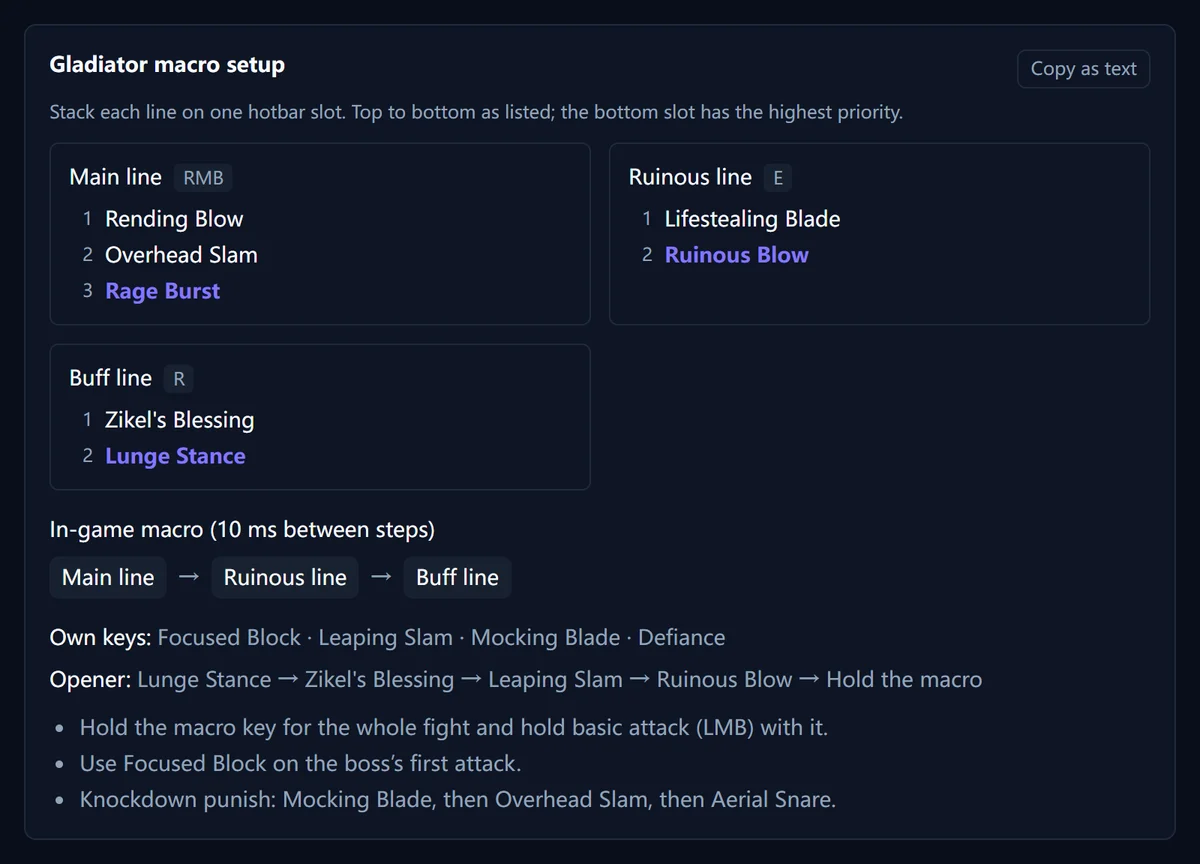
Gladiator macro setup
Stack each line on one hotbar slot. Top to bottom as listed; the bottom slot has the highest priority.
Main line RMB
- 1 Rending Blow
- 2 Overhead Slam
- 3 Rage Burst
Ruinous line E
- 1 Lifestealing Blade
- 2 Ruinous Blow
Buff line R
- 1 Zikel's Blessing
- 2 Lunge Stance
In-game macro (10 ms between steps)
- Main line
- Ruinous line
- Buff line
Own keys: Focused Block · Leaping Slam · Mocking Blade · Defiance
Opener: Lunge Stance → Zikel's Blessing → Leaping Slam → Ruinous Blow → Hold the macro
- Hold the macro key for the whole fight and hold basic attack (LMB) with it.
- Use Focused Block on the boss’s first attack.
- Knockdown punish: Mocking Blade, then Overhead Slam, then Aerial Snare.
Full build: Gladiator build
Templar macro setup
Stack each line on one hotbar slot. Top to bottom as listed; the bottom slot has the highest priority.
Doom Shield line
- 1 Warding Strike
- 2 Shield Smite
- 3 Judgment
- 4 Doom Shield
Pummel line
- 1 Pummel
- 2 Annihilate
- 3 Debilitating Smash
In-game macro (10 ms between steps)
- Doom Shield line
- Pummel line
Own keys: Punishment (charged, on cooldown) · Battlefield Banner · Empyrean Lord's Punishment · Taunt
- Bind the macro to RMB and hold LMB (Vicious Strike) with it.
Full build: Templar build
Assassin macro setup
Stack each line on one hotbar slot. Top to bottom as listed; the bottom slot has the highest priority.
Damage line
- 1 Savage Roar
- 2 Ambush
- 3 Heart Gore
- 4 Insignia Explosion
Buff line (press by hand)
- 1 Triniel's Dagger
- 2 Savage Fang
- 3 Swift Contract
- 4 Illusive Clone
In-game macro (10 ms between steps)
- Damage line
- Quick Slice
Own keys: Buff line · Shadowstrike · Flash Slice · Infiltrate
Opener: Illusive Clone → Swift Contract → Savage Fang → Triniel's Dagger → Hold the macro
- During the 20-second burst window, Heart Gore has no cooldown.
Full build: Assassin build
Ranger macro setup
Stack each line on one hotbar slot. Top to bottom as listed; the bottom slot has the highest priority.
Griffon line
- 1 Burst Arrow
- 2 Snare Shot
- 3 Griffon Arrow
Gale line
- 1 Tempest Shot
- 2 Drill Dart
- 3 Gale Arrow
In-game macro (10 ms between steps)
- Griffon line
- Gale line
Own keys: Snipe (hold LMB) · Deadshot (side mouse button, fully charged) · Marking Shot
Opener: Bow of Blessing → Supporting Fire + Vaizel's Authority → Marking Shot → Fully charged Deadshot
- Use the AION 2 control mode; the in-game macro is restricted in AION 1 mode.
- Turn on skill queue.
Full build: Ranger build
Sorcerer macro setup
Stack each line on one hotbar slot. Top to bottom as listed; the bottom slot has the highest priority.
Buff line
- 1 Delayed Explosion
- 2 Bittercold Wind
- 3 Element Enhancement
Concentration line
- 1 Fire Wall
- 2 Cold Storm
- 3 Wish of Concentration
Fire line
- 1 Firestorm
- 2 Blaze
Ice line
- 1 Ice Chain
- 2 Winter's Shackles
In-game macro (10 ms between steps)
- Buff line
- Concentration line
- Flame Arrow
- Fire line
- Flame Arrow
- Ice line
- Flame Scattershot
Own keys: Hellfire (charged)
Opener: Delayed Explosion → Element Enhancement + Wish of Concentration → Fire Wall + Cold Storm → Bittercold Wind → Winter's Shackles → Hellfire charged to 3 → Hold the macro
- Use 10 ms delays under 50 ms ping and 40–50 ms delays at 80–100 ms ping.
Full build: Sorcerer build
Spiritmaster macro setup
Stack each line on one hotbar slot. Top to bottom as listed; the bottom slot has the highest priority.
Spirit line
- 1 Summon: Fire Spirit
- 2 Summon: Earth Spirit
- 3 Summon: Water Spirit
- 4 Elemental Fusion
Buff line
- 1 Summon: Ancient Spirit
- 2 Flame Blessing
- 3 Enhance: Spirit's Benediction
Damage line
- 1 Combustion
- 2 Dimensional Control
- 3 Jointstrike: Curse
- 4 Jointstrike: Corrode
In-game macro (10 ms between steps)
- Enhance: Spirit's Benediction
- Elemental Fusion
- Jointstrike: Corrode
Own keys: Cold Shock (hold LMB) · Spirit line · Damage line
Opener: Flame Blessing → Enhance: Spirit's Benediction → Summon: Ancient Spirit → Summon spirits
- Works best with ping under about 60 ms.
Full build: Spiritmaster build
Cleric macro setup
Stack each line on one hotbar slot. Top to bottom as listed; the bottom slot has the highest priority.
Prayer line Q
- 1 Condemnation
- 2 Chain of Torment
- 3 Earth Punishment
- 4 Prayer of Amplification
Divine Aura line T
- 1 Judgment Thunder
- 2 Divine Aura
Debuff line 1
- 1 Debilitating Mark
- 2 Lightning Strike Scattershot
Heal line E
- 1 Healing Light
- 2 Light of Regeneration
In-game macro (10 ms between steps)
- Prayer line
- Divine Aura line
Own keys: Earth's Retribution (LMB) · Radiant Recovery · Bolt · Light of Protection (toggle) · Noble Aura
Full build: Cleric build
Chanter macro setup
Stack each line on one hotbar slot. Top to bottom as listed; the bottom slot has the highest priority.
Dark Crush line
- 1 Impactful Crush
- 2 Marchutan's Wrath
- 3 Spinning Strike
- 4 Dark Crush
Gap-closer line
- 1 Tremor Crush
- 2 Rushing Smash
In-game macro (10 ms between steps)
- Dark Crush line
- Incandescent Blow
Own keys: Onslaught (LMB) · Undefeated Mantra (toggle) · Sprint Mantra (toggle) · Recuperation · Power of the Storm
Opener: Power of the Storm → Rushing Smash to the boss → Hold the macro with Onslaught
- Mantras are toggles: switch them on once and keep them out of the macro.
Full build: Chanter build
How do AION 2 macros work?
An AION 2 macro presses a sequence of hotbar lines. A line is several skills stacked on one hotbar slot; when the line fires, the game uses the bottom skill that is off cooldown, then the next one up. So you put your most important skill at the bottom and fillers on top. A macro then chains two to seven lines (or single skills) with a short delay between each step.
How do you set up a macro?
- Open Settings > Key Settings > General > Macro and bind the macro key. It is not bound by default. Most players use the right mouse button or a side mouse button.
- Stack the skills for each line on one hotbar slot, top to bottom as shown above.
- In the macro editor, add each line as a step and set the delay to 10 ms.
- Hold the macro key in combat, together with basic attack on the left mouse button.
What should stay out of the macro?
- Toggles such as Chanter mantras or Cleric’s Light of Protection: switch them on once.
- Charged skills such as Ranger’s Deadshot and Templar’s Punishment: charge them by hand.
- Defensive and movement skills such as Defiance, blocks and gap-closers: you need exact timing.
Which build goes with each macro?
The macros match the stigmas and skills in our class guides. Start from your class page, for example the Gladiator build or the Cleric build, and plan stigma shards with the stigma calculator.
FAQ
How do I set up a macro in AION 2?
What delay should AION 2 macros use?
Why doesn't my AION 2 macro work?
Related Articles
builds
AION 2 Assassin Build (Global): Stigmas, Skills & Macro
Best AION 2 Assassin build for Global Season 1: burst stigmas, Heart Gore and Insignia Explosion priority, passives, Daevanion, Arcana, leveling route and macro.
builds
AION 2 Brawler: Global Release Status & Class Overview
Is the AION 2 Brawler class on Global? Release status, how the gauntlet class plays in Korea and Taiwan, and what to expect before it arrives.
builds
AION 2 Chanter Build (Global): Stigmas, Skills & Macro
Best AION 2 Chanter build for Global Season 1: mantra stigmas, the Dark Crush loop, skill levels, passives, Daevanion path, Arcana, leveling route and macro.
Was this helpful?
Thanks for the feedback!